Cloud Cost Intelligence provides cost optimization recommendations from two sources to help you identify and act on opportunities across your AWS and Azure infrastructure. It analyzes your resource usage patterns using AWS Trusted Advisor and our proprietary Native Intelligence Engine.
중요
Cost optimization recommendations are available for AWS and Azure. Trusted Advisor recommendations are available for AWS only.
Use recommendations to:
- Identify oversized and underutilized resources and commitment opportunities
- View potential savings with monthly and annual projections
- Track and prioritize optimization actions (acknowledge, dismiss, or mark as pending)
Recommendation sources
AWS Trusted Advisor
AWS Trusted Advisor provides cost optimization recommendations directly from AWS.
Prerequisites
To use Trusted Advisor recommendations with Cloud Cost Intelligence, set up and configure access to AWS Trusted Advisor cost insights in your AWS account.
Cloud Cost Intelligence also needs permission to read your Trusted Advisor recommendations:
- If you integrated your AWS account using our CloudFormation template (CFT), Cloud Cost Intelligence grants this permission automatically.
- If you integrated your AWS account manually, you must grant this permission yourself. Without it, Cloud Cost Intelligence can't retrieve your Trusted Advisor recommendations.
How to navigate
Once configured, Trusted Advisor recommendations appear in the Cloud Cost Intelligence Recommendations page alongside other recommendations.
중요
Cloud Cost Intelligence verifies Trusted Advisor status during the initial AWS account integration. When Trusted Advisor is inactive, Cloud Cost Intelligence skips this integration component.
If Trusted Advisor is enabled later, Cloud Cost Intelligence will automatically identify the update and synchronize data within seven days of enablement.
CCI native optimization engine
CCI's native optimization engine analyzes resource utilization and usage history to identify opportunities for right-sizing instances and reducing costs through AWS Savings Plans commitments.
Prerequisites
The native optimization engine relies on New Relic telemetry from your instrumented resources. For accurate and complete recommendations, we recommend instrumenting at least 80% of your resources. The engine can only analyze resources that send telemetry to New Relic. It has no visibility into resources that aren't instrumented. The more coverage you have, the more accurate your recommendations.
How it works
The engine uses AI-driven analysis (a large language model) to evaluate your usage data and recommend an optimization for each workload.
To generate recommendations, the engine analyzes the most recent 30 days of usage data rather than your entire usage history. For example, a recommendation generated on June 25 uses data from May 26 through June 24. As a result, recommendations reflect your current workload patterns.
The engine analyzes usage data in two areas:
- Right-sizing: Checks CPU and memory usage, compares current instance types to performance needs, and identifies instances that can be downsized without affecting performance.
- Savings plans: Reviews usage patterns to find consistent workloads and calculates potential savings from AWS Savings Plans commitments, including both compute and database savings plans.
The native optimization engine provides right-sizing recommendations for the following services:
- AWS: AmazonEC2, AmazonRDS, and AmazonRedshift
- Azure: AzureVM, AzurePostgreSQL, and AzureMySQL
Savings plan recommendations are available for AWS only.
What recommendations it provides
The engine provides recommendations to reduce costs:
- Instance type changes: Specific instance modifications with current configuration, CPU and memory usage, and number of affected instances
- Savings plan commitments: Recommendations to commit to consistent usage levels for discounted pricing
- Savings projections: Monthly and annual cost savings for each recommendation
View recommendations
To access your cost optimization recommendations:
- Go to one.newrelic.com > All capabilities > Cloud Cost Intelligence
- Click Recommendations in the left navigation.
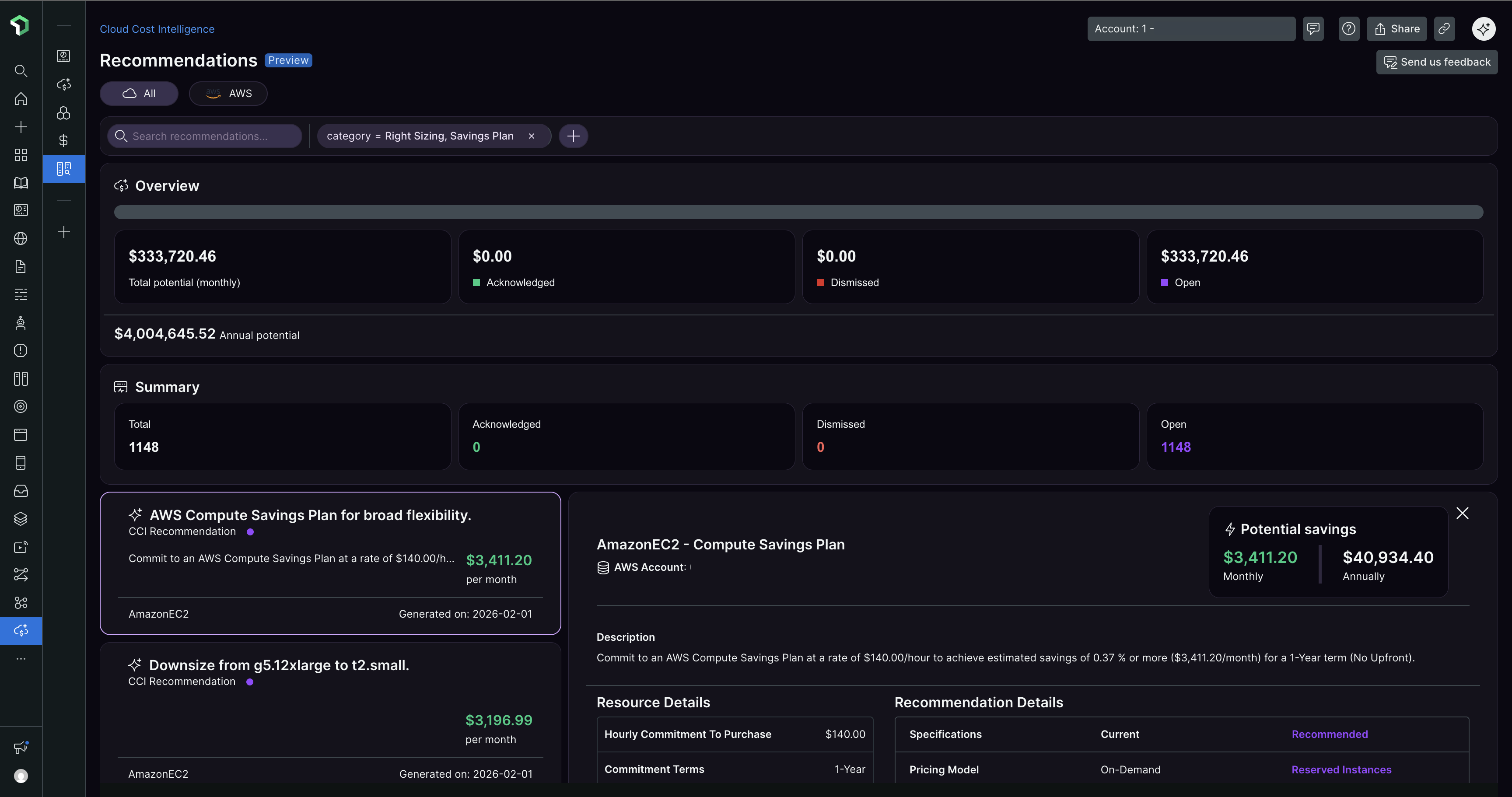
Overview section
The Overview section shows key cost optimization metrics:
Item | Description |
|---|---|
Total potential | Total savings across all pending recommendations |
Acknowledged | Savings from acknowledged recommendations |
Dismissed | Savings from dismissed recommendations |
No action taken | Savings from pending recommendations |
Annual potential | Projected annual savings |
Summary metrics
The Summary section shows recommendation counts:
Item | Description |
|---|---|
Total | All available recommendations |
Acknowledged | Acknowledged recommendations |
Pending | Recommendations awaiting action |
Dismissed | Dismissed recommendations |
View recommendation details
Each recommendation card shows:
Item | Description |
|---|---|
Recommendation title | Optimization action |
Source | Recommendation source (such as CCI native model, Trusted Advisor) |
Service type | Cloud service (such as AmazonEC2) |
Monthly savings | Potential monthly cost savings |
Generated timestamp | Generation date and time |
Click a recommendation to view:
Item | Description |
|---|---|
Potential savings | Monthly and annual savings breakdown |
Cloud Provider Account | AWS account ID |
Resource details | Current configuration and recommended changes |
Number of Occurrences | How many consecutive weekly analysis cycles this recommendation has appeared in. For example, a recommendation that appeared in 3 consecutive weekly runs shows 3. This is not a count of matching instances. |
Original Instance Type | Current instance configuration |
Actual CPU Usage Percentage | Current CPU utilization |
Actual Memory Usage | Current memory utilization |
Take action on recommendations
For each recommendation, you can:
Action | Description |
|---|---|
Acknowledge | Mark that you've reviewed the recommendation and are acting on it. Use this when you've found the recommendation useful and plan to implement it or are already implementing it. |
Dismiss | Remove from your active list (use when not applicable to your use case or business requirements) |
No action (Pending) | Leave in pending status for later review |
Add notes | Add and save notes for future reference and cross-team collaborations |
These statuses help you organize and prioritize your cost optimization efforts, and track your progress in the Overview and Summary sections.