You can tailor the Node.js agent to your app's requirements by editing your newrelic.js config file or by setting an environment variable. The config file resides in the root directory of your app. You can also configure a few options from New Relic, or use the Node.js agent API.
Get started
You'll be able to configure our Node.js agent to suit your environment after you create a New Relic account (it's free, forever) and install the Node.js agent.
The license_key setting is required. Also, we highly recommend setting the app_name so that your app has a meaningful name instead of the default My Application.
Configuration methods and precedence
The primary method to configure the Node.js agent is the agent configuration file (newrelic.js). You can also configure most settings with environment variables. You can also adjust some settings with server-side configuration.
The Node.js agent uses this order of precedence for configuration methods:
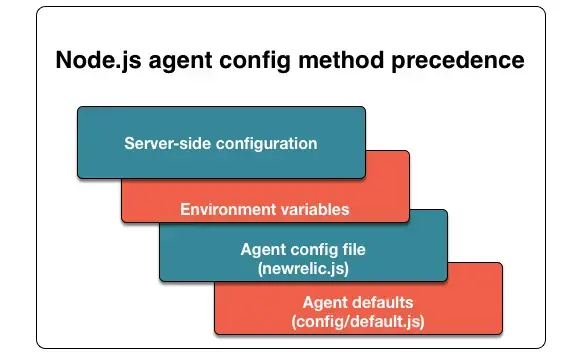
Node.js configuration hierarchy: Server-side configuration settings override environment variables. Environment variables override the agent config file. The config file overrides the agent defaults.
Here are detailed descriptions of each configuration method:
Important
The two settings you must configure are your app name and license key — set via app_name and license_key in newrelic.js (or the NEW_RELIC_APP_NAME and NEW_RELIC_LICENSE_KEY environment variables). All other settings are optional.
Settings reference
All configuration settings are documented in the sub-pages below. Each setting shows its type, default value, and environment variable equivalent.
| Settings page | What it covers |
|---|---|
| General settings | Core agent behavior: app name, license key, proxy, and configuration methods |
| Logging settings | Agent log output and audit logging of collector payloads |
| AI monitoring settings | LLM telemetry, streaming, and content recording |
| Attributes settings | Which attributes are captured and forwarded across transactions, errors, browser, and span events |
| Error collector settings | HTTP status codes and error classes to ignore or mark as expected |
| Transaction tracer settings | Trace thresholds, SQL recording, slow query collection, and datastore instance reporting |
| Browser monitoring settings | JavaScript header injection and browser monitoring attribute forwarding |
| Distributed tracing settings | W3C trace context, sampling, span events, Infinite Tracing, and gRPC |
| Logs in context settings | Log forwarding, local log decoration, logging metrics, and label forwarding |
| Other settings | Cloud provider variables, API configuration, event sampling, URL obfuscation, security, and more |