preview
We're still working on this feature, but we'd love for you to try it out!
This feature is currently provided as part of a preview program pursuant to our pre-release policies.
Overview
Cloud Cost Intelligence provides visibility and management of cloud costs across all your cloud providers. It bridges the gap between cost visibility and infrastructure observability, offering a holistic view of your cloud expenditures.
As enterprises scale their cloud services rapidly, managing and tracking cloud expenses becomes increasingly complex. Cloud Cost Intelligence offers insights into your cost allocation, enabling you to identify potential savings opportunities. By matching cloud expenditures with actual usage, you can optimize budgets while supporting strategic growth initiatives, ensuring that every dollar invested contributes to your company's overall success.
Get started
Connect your cloud provider to start monitoring and optimizing your cloud costs. Choose your provider below to begin setup:
Key features
Intelligent summary
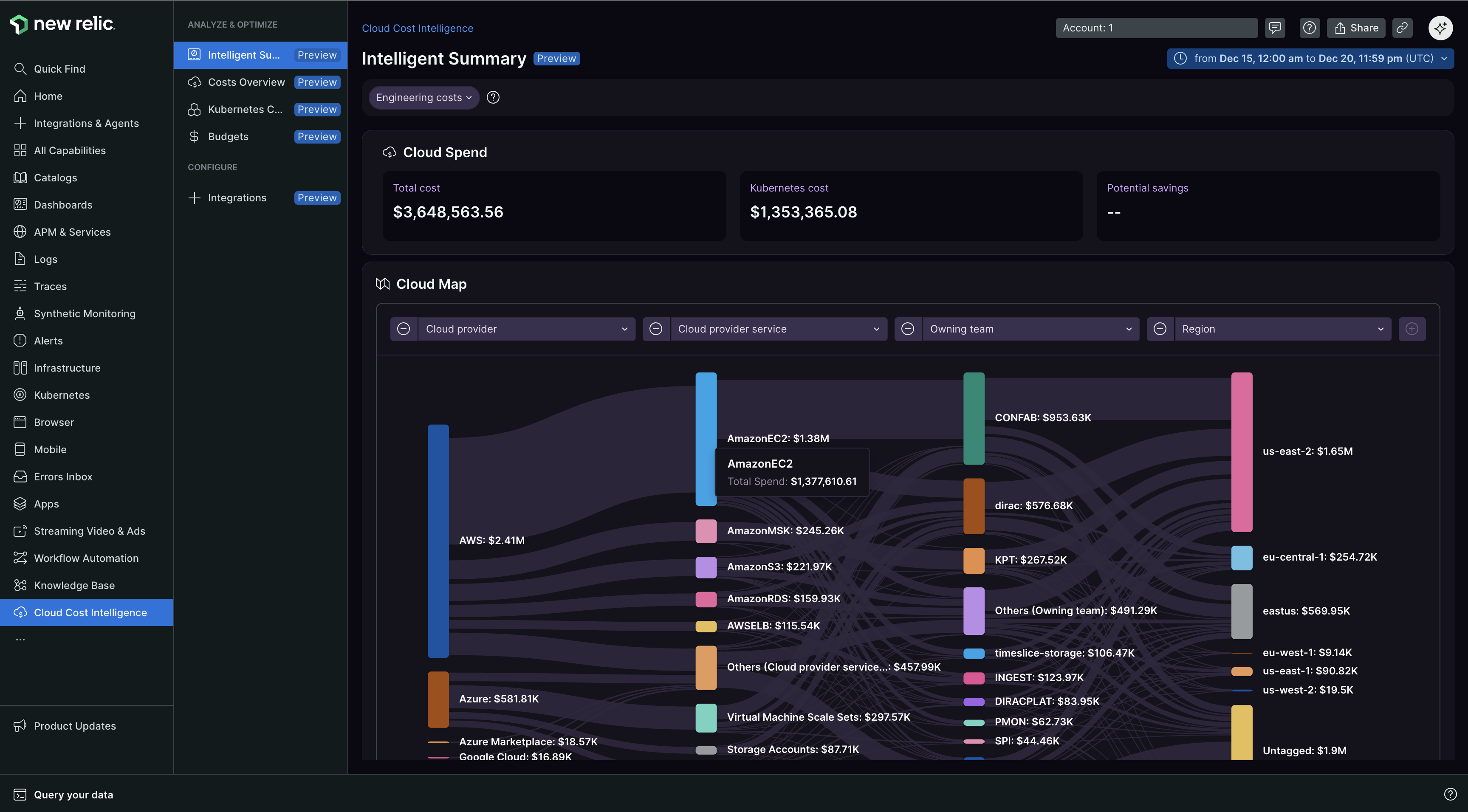
The Intelligent summary page is your primary landing page for Cloud Cost Intelligence. It displays all your cloud spending in one place, showing how costs move through your organization, broken down by services, teams, and regions. You can navigate the page and change views based on your needs.
Key features include:
- Sankey chart: Navigate dynamic Sankey chart visualizations to drill down into cost details
- Cost segregation: Costs segregated by services, teams, and regions
- Dynamic views: Switch between different view types (for example, accounts view)
- Breakdown by category: Cloud costs segmented by application, service, owning team, and region
- Trend analysis: Month-over-month cost trends, average costs, and top cost drivers
Cost Overview
The Cost Overview page provides detailed cost analysis with drill-down functionality to explore costs across multiple dimensions, from service level down to individual resources.
Kubernetes cost allocation
View Kubernetes costs broken down by application name using New Relic telemetry data.
Real-time cost estimation
Cloud Cost Intelligence provides hourly cost updates using telemetry data and historical cost patterns, reflecting changes within an hour of resource provisioning. Integration with your billing data enables cost estimates based on the average unit price from the past week and New Relic telemetry data for the recent 48-hour period. Without this integration, estimates default to potentially higher standard unit pricing rates.
For the most accurate estimates, integrate telemetry and maintain at least 7 days of historical data. Without such data, estimates revert to on-demand pricing, the standard pay-as-you-go model used by cloud providers.
Cross-account data collection
Cloud Cost Intelligence can collect telemetry data from all New Relic accounts you have access to. Even if you use a single account for Cloud Cost Intelligence, data from all other accounts you can access can also be used to collect and insights in that account. Verify your account permissions align with your internal data access policies, and configure the same through Settings.
How it works
Data collection
After setup is complete, Cloud Cost Intelligence automatically accesses your cost and usage data from your designated object storage container. Our service can only retrieve reports after they have been exported to your storage container. Ensure the folder path prefix is configured correctly during setup.
Your cloud provider typically updates billing data several times a day. After initial setup, Cloud Cost Intelligence retrieves the latest report from your storage location on an hourly basis. The most recent cost data appears in our platform shortly after your provider publishes the update.
Your data privacy: Cost and Usage Reports contain data about your usage of cloud services and their costs, which should not include personal data. Ensure the data you send is free from personally identifiable information (PII) or sensitive information before adding the Cost and Usage Reports to your storage and before uploading to New Relic. Data deletion is not currently supported. We recommend not generating Cost and Usage Reports with PII or sensitive information.
Data retention: Data is retained for up to 5 years. After 2 years, data is moved to lower-cost storage with longer retrieval times.
Viewing access: Anyone with access to the New Relic account you select during installation can view all data within Cloud Cost Intelligence. Choose an account with suitable access privileges to match your RBAC and access policy requirements.
Data analysis and reporting
After retrieving Cost and Usage Report data, Cloud Cost Intelligence processes and analyzes this information to deliver actionable insights in its dashboards. Visualize the financial implications of your cloud usage, identifying cost drivers and potential areas for optimization.